How to Build an Internal Linking Strategy for a SaaS Blog (2026 Guide)
Publishing consistently is not enough to make a SaaS blog rank.
You can have solid writing, a realistic keyword plan, and a healthy publishing cadence and still end up with a blog that feels fragmented. Articles sit in isolation, important product pages get very little contextual support, and search engines never get a clear picture of which topics your site truly owns.
The missing layer is usually internal linking.
Internal links turn a blog from a collection of articles into a connected system. They can help search engines discover and understand relationships between pages, guide readers from awareness to evaluation, and direct attention toward URLs that matter to the business.
This guide explains how internal linking supports discovery, relevance, and navigation, which frameworks work especially well for SaaS companies, and how to build a workflow your team can maintain as the archive grows.
What Internal Linking Means for a SaaS Blog
An internal link is a link from one page on your site to another page on the same domain.
The definition is simple. The impact is not.
On a SaaS blog, internal links do more than help users browse related content. They support three business jobs at the same time:
- They help search engines discover, crawl, and interpret your content
- They help your site express which pages are related and which pages are important to the user journey
- They move readers from informational content toward commercial pages when the timing is right
That last point matters more for SaaS than for many other publishing models. A SaaS blog is usually expected to educate top-of-funnel readers, nurture mid-funnel readers, and help bottom-of-funnel readers discover the product. Internal links are one of the cleanest ways to connect those journeys.
Without a clear linking strategy, that journey breaks down. Users bounce between isolated posts. Product pages receive far less support than they should. New articles get published without enough incoming links. Over time the archive becomes large but structurally weak.
Why Internal Linking Matters for Discovery and Relevance
Search engines use links to discover pages and understand relationships within a website. Internal links are one of the clearest structural signals you can improve directly.
1. They clarify content relationships
Internal links tell Google which pages belong together.
If your site has guides on internal links, orphan pages, broken links, and crawl audits, but those pages barely reference one another, the topical picture stays blurry. If they are tightly connected, the relationship becomes obvious. That makes the relationship between the pages easier for readers and search engines to understand.
2. They help connect important pages
Some pages naturally attract more visits, links, or business value than others. That may be your homepage, a guide with backlinks, a widely shared benchmark report, or a post that already ranks well.
Internal linking lets you connect those stronger or more visited pages to:
- Product pages
- Feature pages
- Comparison pages
- Underperforming but important blog posts
A focused update to high-potential pages can therefore be more useful than publishing another net-new post.
3. They reinforce keyword context through anchor text
Anchor text is the visible text inside a link.
If a page is repeatedly linked with vague anchors like “read more” or “this guide,” you lose useful context. If the anchor describes the destination clearly, the page gets a stronger topical signal and the reader understands what to expect.
Descriptive does not mean forced. It means precise, relevant, and natural in the sentence.
SaaS Internal Linking Frameworks That Actually Work
SaaS teams usually need more structure than a generic “link related posts together” rule.
The most effective internal linking setups tend to use a combination of these frameworks.
Hub-and-spoke clusters
This is the foundation for most SaaS blogs.
- A pillar or hub page covers a broad strategic topic
- Supporting articles cover narrower questions inside that topic
- Supporting articles link back to the hub
- Related supporting articles cross-link where it helps the reader
For example, an internal-linking hub may connect to posts on how to find internal linking opportunities you’re missing, how to find orphan pages, and how to monitor broken links automatically.
This model works because it creates depth, not just volume. Search engines can see that you are not publishing random SEO content. You are building a coherent body of knowledge around a topic the product actually supports.
Funnel-based linking
Traffic alone does not pay for a SaaS content program. Intent alignment does.
A good SaaS blog deliberately links across funnel stages:
- Top-of-funnel educational posts
- Mid-funnel comparisons, workflow guides, and problem framing
- Bottom-of-funnel feature, use-case, or product pages
For example, a reader may start with a basic guide, move to a tactical post, and then click into a product page once they understand the operational cost of doing the work manually. Internal links make that transition possible without making the article feel like a landing page.
Feature-led linking
Many SaaS blogs underuse their own feature pages.
Every blog does not need a product link. But every blog should be reviewed for whether the problem being discussed naturally connects to:
- A feature page
- A free tool
- A use-case page
- An integration page
- A comparison page
This is not about turning every paragraph into a pitch. It is about reducing the gap between problem education and solution discovery.
Step 1: Audit Your Existing Content First
Do not start by adding links manually. Start by getting visibility into the structure you already have.
You need to identify:
- Orphan pages with no incoming internal links
- Broken internal links and redirect chains
- Pages with strong inbound links that can support related content
- Underperforming pages that deserve more support
- Clusters that exist in theory but not in the actual link graph
On a small archive, some of this can be done with spreadsheets. On a serious SaaS content library, manual review usually breaks down quickly.
That is where crawler-backed analysis becomes useful. redCacti gives you a clean view of what your site structure actually looks like rather than what the team assumes it looks like.

Once a crawl is complete, you can see which pages are discovered, how links are distributed, and where structural problems are accumulating.
If your team has not done this work recently, start with orphan pages. They are a clear signal that publishing may have outpaced site structure. Our guide on how to find orphan pages goes deeper on that part of the workflow.
Step 2: Define the Core Topics Your Blog Should Own
Once you know what is broken, define what the blog is supposed to support.
For SaaS teams, that usually means selecting a small set of product-adjacent themes. Examples might include:
- Internal linking
- Broken links
- Orphan pages
- Crawlability
- Site health
- Content optimization
The exact list depends on what your product helps users solve.
These become your pillar topics. Every topic should eventually have:
- A central hub or pillar page
- Supporting articles answering narrower questions
- Clear paths to commercial pages where intent makes sense
If a topic does not matter to your product, your buyer journey, or your long-term search goals, it probably does not deserve heavy internal linking effort.
This is one reason SaaS internal linking strategy is different from a general blog strategy. You are not just organizing articles by keyword similarity. You are organizing them around the problems your product is built to solve.
Step 3: Build Topic Clusters Instead of Standalone Posts
Once core topics are defined, group related content into clusters.
Each cluster should answer a simple question: which page is the main resource, and which pages strengthen it?
A healthy cluster usually includes:
- One pillar page or hub page
- Multiple supporting posts covering subtopics
- Cross-links between related supporting posts
- Links to relevant product or feature pages when useful
For example, an orphan-page cluster may include:
- A primary guide to finding orphan pages
- A post on how to fix orphan pages Google cannot find
- A post on how to prevent orphan pages as the site grows
- A post on rescuing orphan pages with strong traffic potential
Those pages should not exist as isolated pieces. They should reinforce one another.
This is also where many teams go wrong. They link every supporting article upward to the pillar page, but they do not link laterally across adjacent questions. Readers do not move through content in a perfect parent-child pattern. They often move sideways. Your internal links should support that behavior.
Step 4: Add Contextual Internal Links, Not Random Ones
Not all internal links are equally useful.
The strongest internal links are contextual. They appear inside the body copy at the moment the destination page becomes relevant to the reader.
Good contextual linking usually follows three rules:
- The destination page is genuinely useful in that moment
- The anchor text explains what the destination is about
- The link feels like part of the editorial flow, not an interruption
This is where internal linking gets difficult as the site grows. Teams know what good linking looks like, but they struggle to apply it consistently across dozens or hundreds of posts.
redCacti helps here by comparing page content and context to identify related pages and suggest which pages should link to which. Instead of guessing, the editorial team gets a prioritized list of opportunities to review.

Random linking is not a substitute for relevance. The link should help the reader and fit the source page.
If you want a deeper walkthrough of this discovery process, how to find internal linking opportunities you’re missing covers the audit side in more detail.
Step 5: Prioritize the Pages That Can Move the Needle
Internal linking is a resource allocation problem. Some pages deserve much more support than others.
Focus first on:
- Pages ranking on page two or page three
- Product and feature pages with commercial value
- Comparison pages with buying intent
- Hub pages that anchor major topics
- Strong posts with backlinks that can support related pages
This is where many teams waste time. They add a few extra links everywhere and expect that to produce meaningful outcomes.
A better approach is to choose a short list of strategic pages and deliberately increase the quality and quantity of contextual links pointing toward them.
Small changes on high-potential pages often outperform broad but shallow link cleanups across the whole archive.
Step 6: Build Links Before You Publish, Not Just After
Most content teams think about internal links at the end of the publishing workflow.
That is too late.
A stronger process reviews internal links before the article goes live, while there is still time to place them where they fit naturally.
That pre-publish review should answer:
- Which hub page should this article reinforce?
- Which existing posts should it link to?
- Which older posts should link back to this new article?
- Is there a relevant product, feature, or tool page that belongs here?
redCacti’s article analysis workflow is useful for this because it maps draft content to existing pages before publication and suggests sentence-level link placement opportunities.

This prevents one of the most common SaaS blog mistakes: publishing a good article that has outgoing links but no real incoming support from the archive.
Common Internal Linking Mistakes SaaS Teams Keep Repeating
Orphan pages
If a page has no incoming internal links, it is structurally weak no matter how good the content is.
Random linking
Adding links without a clear topic or funnel logic can dilute structure instead of strengthening it.
Ignoring product pages
If educational content never helps users discover the product, you are leaving revenue on the table.
Weak anchor text
Generic anchors waste context that could help both readers and search engines.
Manual-only workflows
Once the archive gets large, memory-based linking stops working reliably.
The Real Bottleneck: Maintaining Internal Links as Your Site Grows
Most SaaS teams understand that internal linking matters. The real problem is operational.
The challenges usually look like this:
- Hundreds of pages across the blog and product site
- Constant publishing creating new link opportunities every week
- No shared view of which pages need more internal links
- No reliable process for updating older content when new posts go live
This is exactly where redCacti is useful. It turns internal linking from a vague best practice into a concrete workflow.
1. Full site crawl
The platform crawls your site so you can see the internal structure it discovered and track changes over time.
2. Orphan and broken page detection
It surfaces disconnected pages, broken links, and redirect issues so you can review weak paths before they affect readers or conversions.
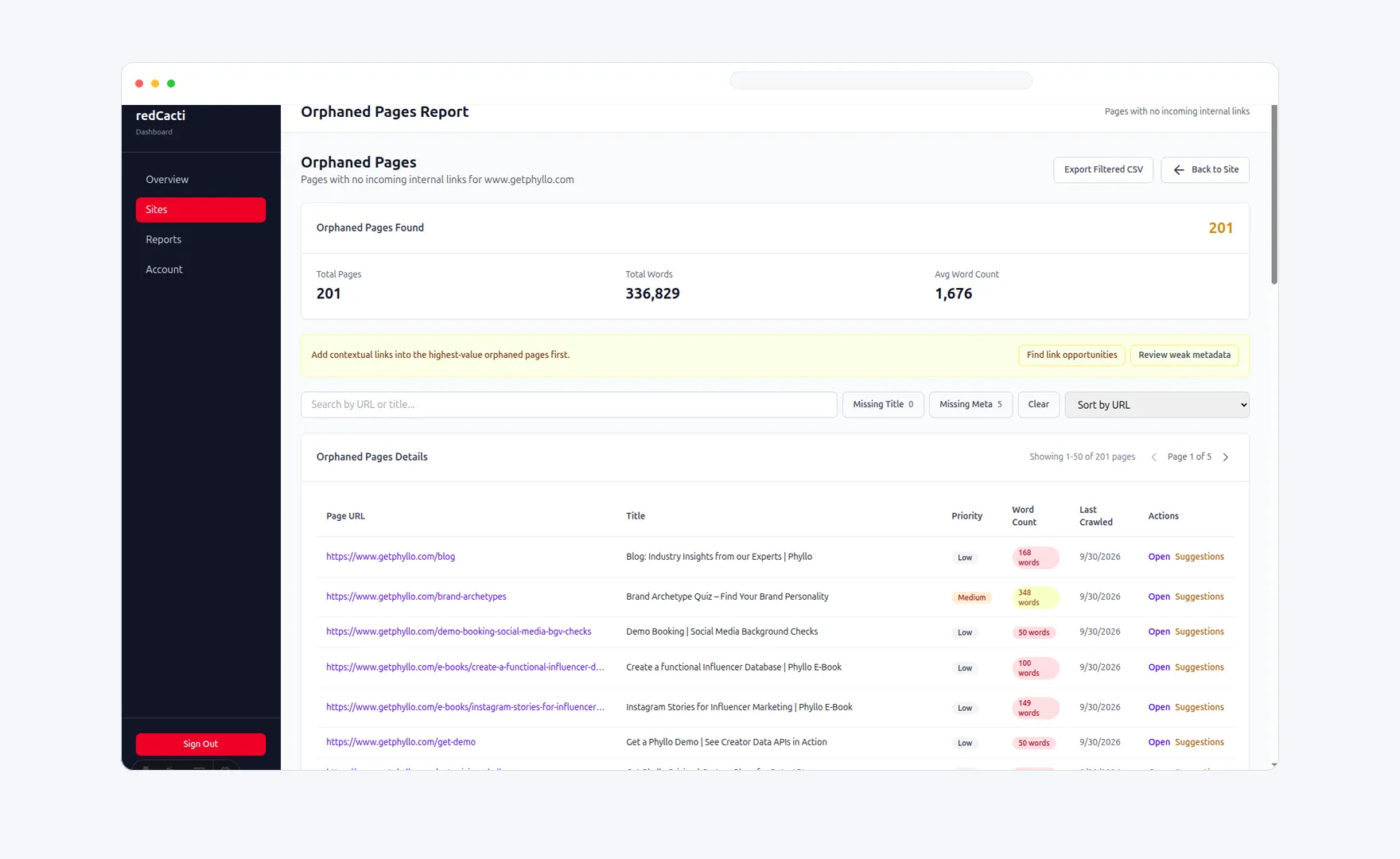
3. Link suggestions and prioritization
Instead of giving you only raw reports, it identifies related pages, suggests anchor text, and helps you prioritize fixes based on the page’s role and the surrounding content.
4. Pre-publish article analysis
Draft content can be reviewed before publication so the right links are placed early rather than retrofitted later.
5. Ongoing monitoring
As the site changes, the workflow stays active. That matters because internal linking is not a one-time project. Every new article, redirect, and cluster update can change the graph.
A Practical Internal Linking Checklist for SaaS Teams
Before publishing a new article or updating an old one, check:
- Does this post belong to a clear topic cluster?
- Does it link to the right hub page?
- Does it link to related supporting posts?
- Does it deserve a link to a product, feature, or use-case page?
- Are the anchors descriptive and natural?
- Will at least one older post link back to this article?
- Have orphan pages and broken links been reviewed recently?
This is the difference between isolated content production and a content system that improves as the site grows.
Worked Example: Connect a SaaS Internal-Linking Cluster
The example below is illustrative, not a customer result. A SaaS team could connect its content like this:
| Page or content type | Link to | Reader intent |
|---|---|---|
| A broad internal-linking guide | How to Build an Internal Linking Strategy for a SaaS Blog | Learn the implementation process |
| The detailed SaaS blog guide | Internal Linking for SaaS | Return to the broader site-architecture framework |
| An article about finding missed opportunities | Internal Linking Tool | Move from education to crawl-based discovery |
| An orphan-page article | Orphan Page Finder | Move from diagnosis to a focused workflow |
The point is not to create a fixed number of links. Each link should have a clear source, destination, anchor, and reason. Review the surrounding paragraph and remove any link that does not improve the reader’s next step.
How to Validate an Internal-Linking Change
After publishing an update:
- Crawl the site again and confirm that the intended links are present.
- Check that the destination returns the preferred URL and does not introduce a redirect chain.
- Review orphan-page and broken-link reports for resolved and newly introduced issues.
- Track clicks, impressions, rankings, and conversions separately. A cleaner crawl does not by itself prove a ranking improvement.
Sources and Scope
Google’s link best practices recommend descriptive anchor text and contextual cross-references between pages. Google’s structured data guidance also explains that valid markup can make a page eligible for rich results but does not guarantee that a rich result will appear. This guide is a practical framework, not a promise of rankings or search visibility.
Final Takeaway
Internal linking is a useful SEO and information-architecture system for a SaaS company.
It is not only about rankings. It is about structure, discovery, and conversion flow. When your blog is connected well, search engines can understand your topical depth, readers can navigate to the next useful step, and important commercial pages receive the support they need from the rest of the site.
The difference between an average SaaS blog and a high-performing one is often not content quality alone. It is how well that content is connected.
If you want to turn internal linking into a repeatable workflow instead of a manual cleanup project, sign up for redCacti and use crawl data, orphan-page reporting, link suggestions, and pre-publish article analysis to keep your structure healthy as the site grows.
Related reading: How to Find Internal Linking Opportunities You’re Missing - How to Fix Orphan Pages Google Can’t Find - How to Monitor Broken Links Automatically
FAQ
How many internal links should a SaaS blog post have?
There is no fixed number that works for every post. A better rule is to include enough contextual links to support the topic cluster, guide the reader to adjacent resources, and connect to relevant commercial pages when the intent makes sense.
Should SaaS blog posts link to product pages?
Yes, when the problem being discussed naturally leads to a product, feature, or workflow page. The link should help the reader take the next logical step, not interrupt an informational section with an unrelated pitch.
What is the fastest way to find orphan pages?
Use crawl data and compare it against the URLs you expect to exist on the site. Pages with no incoming internal links are usually the clearest orphan-page candidates.
Should every supporting article link back to a pillar page?
Usually, yes. Most supporting content should reinforce the relevant hub or pillar page somewhere in the article, while also linking laterally to adjacent supporting content when helpful.
When should a SaaS team use an internal linking tool?
Usually when the archive is large enough that editors cannot manage link opportunities accurately from memory, new posts are being published without incoming support, or orphan pages and weak clusters are starting to pile up.
Newsletter
Weekly SEO teardowns
Internal linking, broken links & orphan pages - straight to your inbox, every week.