Different teams own different sections
Marketing may own the main site and blog. Product may own documentation. Partnerships may publish integrations. Engineering may operate app and authentication subdomains.
SaaS Technical SEO
Find the technical and structural problems that prevent product pages, use cases, integrations, comparisons, and content from being crawled, understood, and connected properly.
The goal of this audit is not to produce the longest issue list.
It is to determine whether search engines can consistently discover, crawl, understand, and prioritize the pages that help your SaaS company acquire customers.
Quick answer
A SaaS technical SEO audit is a structured review of how search engines access, crawl, render, index, and interpret the public pages across a software company's website.
It should examine crawlability, indexability, canonicals, XML sitemaps, robots directives, HTTP responses, redirects, JavaScript rendering, internal linking, orphan pages, metadata, structured data, mobile usability, Core Web Vitals, and recurring regressions.
It should also account for SaaS-specific architecture: product pages, feature pages, use cases, integration directories, alternative and comparison pages, documentation, programmatic pages, login or app subdomains, and staging environments.
Why SaaS is different
A growing SaaS site rarely consists of one neat marketing website. Different teams create different sections, often using different systems and URL conventions.
Marketing may own the main site and blog. Product may own documentation. Partnerships may publish integrations. Engineering may operate app and authentication subdomains.
Feature launches, product renaming, new integrations, CMS migrations, navigation redesigns, and programmatic publishing can introduce broken links, redirects, duplicates, or disconnected pages.
Integration, comparison, template, and industry libraries usually depend on hubs, breadcrumbs, contextual links, and related-page modules rather than the primary menu.
A company may operate www, app, docs, help, developer, status, staging, and preview hosts. The audit must distinguish public acquisition content from private or non-search environments.
Tool boundaries
redCacti is useful for the recurring structural layer of a SaaS technical audit. It is not positioned as a replacement for every specialist SEO or developer tool.
47-point SaaS technical SEO checklist
Do not treat every URL as equally important. Begin with the pages most closely connected to product discovery, evaluation, pricing, signup, and demand generation.
Review these page types first:
A live acquisition page should normally return a successful 200 response. Investigate important URLs returning redirects, 404 or 410 responses, 5xx errors, timeouts, or inconsistent responses.
Review whether public acquisition sections are accidentally blocked, including feature, integration, alternative, comparison, template, solution, and resource directories. robots.txt controls crawling; it is not a reliable way to guarantee that a URL never appears in search.
Check both HTML meta robots tags and X-Robots-Tag HTTP headers. Staging rules, CMS settings, or template errors can accidentally leave important production pages marked noindex.
Check for canonicals pointing to the homepage, a different product page, staging, HTTP versions, parameter variants, or inconsistent trailing-slash versions. A canonical is a strong signal to Google, but Google can choose a different canonical.
Important canonical pages should generally appear in the sitemap. Avoid including redirects, broken URLs, noindexed pages, duplicate URLs, staging URLs, or noncanonical variants.
Important pages should not depend only on sitemap inclusion, direct traffic, Search Console submission, paid campaigns, or external backlinks. Link them from relevant product, feature, blog, comparison, integration, documentation, breadcrumb, or hub pages.
Review how many steps are required to reach important pages from the homepage and major section hubs. The goal is not to put every URL in the main navigation, but to create sensible hub and contextual paths.
Test representative JavaScript-heavy pages with Search Console URL Inspection, browser rendering tools, or JavaScript-enabled crawlers. Watch for content, links, canonicals, or metadata that appear only after client-side execution.
Check that mobile users receive the essential content, important navigation, crawlable links, correct metadata, usable forms, and working interactive elements.
The SEO landing page can work perfectly while the commercial journey fails. Test CTA links, forms, signup routes, calendars, and mobile conversion paths.
Choose one preferred HTTPS hostname and redirect other variants consistently. Avoid unnecessary redirect chains between HTTP, HTTPS, www, and non-www variants.
Use one canonical URL convention consistently across internal links, sitemaps, canonicals, redirects, structured data, and navigation.
Classify tracking, sorting, filtering, search, pagination, referral, language, and application-state parameters. Decide whether each should remain indexable, canonicalize elsewhere, redirect, be noindexed, or be excluded from crawling.
Decide which login, signup, private dashboard, workspace, shared-report, or user-generated URLs should be publicly searchable and which should be authenticated or excluded from indexing.
Look for staging, preview, development, branch-preview, and CMS-preview domains. Where content must remain private, authentication is safer than relying only on robots.txt.
Duplicates often appear after product renaming, campaign launches, acquisitions, navigation changes, pricing updates, and migrations. Redirect, consolidate, canonicalize, or reposition them based on search intent.
Integration, template, industry, comparison, glossary, and API-reference pages should have a real purpose, unique useful information, correct canonical tags, supporting internal links, and a logical place in the architecture.
Blog, integration, template, and resource libraries may create pagination, tags, filters, author archives, date archives, and site-search URLs. Decide which states deserve independent search visibility.
Decide whether old pages should remain evergreen, redirect to a relevant replacement, be consolidated, return 410, or be excluded from indexing. Avoid redirecting every expired page to the homepage by default.
This is where otherwise strong SaaS content often becomes disconnected from the product.
Relevant educational content should naturally lead to product capabilities, features, use cases, templates, integrations, comparisons, documentation, or conversion paths when those destinations help the reader.
Feature pages explain what the product does. Use-case pages explain why a specific audience needs it. Connect features, use cases, customer stories, integrations, documentation, and pricing where useful.
Integration pages should explain what the integration enables, how it relates to the core product, which workflows it supports, what documentation exists, and what the next commercial step is.
High-intent alternative and comparison pages should connect to relevant product capabilities, pricing, migration guidance, customer evidence, security information, integrations, and signup or demo routes.
Documentation can link to relevant feature, onboarding, integration, and support pages. Marketing pages can link to deeper documentation when implementation detail helps the user.
For every page with no incoming internal links, decide whether to add a contextual link, add it to a relevant hub, consolidate it, redirect it, noindex it, remove it, or intentionally keep it isolated.
A page does not need to be fully orphaned to be weakly supported. Review commercially important pages that receive links only from footers, archives, directories, or a single outdated article.
Use descriptive, natural anchors that set expectations about the destination. Avoid relying heavily on generic anchors such as click here, learn more, or read more.
Update internal links to point directly to final destinations where practical rather than permanently sending users and crawlers through old feature names, HTTP URLs, or redirect chains.
Prioritize failures in navigation, pricing and product pages, high-traffic content, integration and comparison pages, documentation, and then lower-value archives.
Large directories and generated templates can create pages with hundreds or thousands of links. Ask whether the links are useful, whether the page should be divided into hubs, and whether filters create crawlable combinations.
| Page type | Commonly useful destinations |
|---|---|
| Blog article | Feature, use case, template, integration, related article |
| Feature page | Use case, pricing, documentation, comparison |
| Use-case page | Feature, customer story, integration, pricing |
| Integration page | Product capability, documentation, related integration |
| Comparison page | Product, feature, pricing, migration guide |
| Documentation | Product feature, onboarding, support |
| Template page | Feature, use case, related templates |
| Pricing page | Relevant feature details, FAQ, security, signup |
Find missing, duplicate, vague, inherited, outdated, or unnecessarily repetitive titles. Important pages should have descriptive titles that reflect their distinct intent.
Review missing, duplicate, default, misleading, and poorly targeted descriptions. Google may rewrite snippets, but useful descriptions still help explain the page.
Confirm each important page has a clear primary heading that reflects the visible purpose and current product terminology.
Check for heading levels chosen only for styling, repeated template headings, skipped hierarchy, or important sections without meaningful headings.
Programmatic pages can use templates, but the resulting titles and descriptions should contain enough specific information to distinguish integrations, industries, competitors, locations, templates, or product combinations.
Use the relevant validation tool for Organization, SoftwareApplication, Product, BreadcrumbList, Article, VideoObject, or other supported markup. Structured data should describe visible page content accurately.
Review Open Graph title and description, social images, Twitter card settings, absolute image URLs, and page-specific sharing previews.
Check meaningful alt text, empty alt text for decorative images, dimensions, responsive image sizing, file size, and whether critical information exists only inside screenshots.
Google currently defines the Core Web Vitals as Largest Contentful Paint (LCP), Interaction to Next Paint (INP), and Cumulative Layout Shift (CLS). The "good" thresholds are LCP at or below 2.5 seconds, INP at or below 200 milliseconds, and CLS at or below 0.1, evaluated at the 75th percentile of page visits.
LCP
≤ 2.5s
Loading performance
INP
≤ 200ms
Responsiveness
CLS
≤ 0.1
Visual stability
Source: web.dev Core Web Vitals thresholds
Test more than the homepage. Include product, pricing, article, integration, comparison, documentation, and signup templates.
Inventory analytics, chat, personalization, A/B testing, session recording, advertising, tours, schedulers, and forms. Decide whether every script needs to load on every page or during initial rendering.
Watch for autoplay video, oversized screenshots, uncompressed images, unnecessary high-resolution assets, and large media loaded immediately on mobile.
Check cookie banners, chat launchers, embeds, fonts, images without dimensions, pricing tables, experiments, and late-loading navigation.
Investigate hosting location, caching, server-side rendering, middleware, redirects, database calls, third-party dependencies, and cold starts.
A one-time audit becomes outdated as the website changes. New pages, redirects, CMS updates, navigation changes, and releases can reintroduce problems.
Record crawlable page count, broken links, orphan pages, redirects, server errors, metadata problems, internal-link opportunities, and available site-health indicators.
Use daily or weekly scheduled crawls on paid redCacti plans based on how quickly the site changes. Run manual crawls after migrations, redesigns, URL changes, or major releases.
Ask which issues are new, which disappeared, whether a release created broken links or new orphans, and whether page count or metadata changed unexpectedly.
Route content issues to content or SEO, navigation and response-code problems to web or engineering, and canonical, sitemap, or redirect mapping issues to the teams responsible for implementation.
Prioritization
Two critical defects on acquisition pages can matter more than hundreds of low-value warnings elsewhere.
| Priority | Meaning | Examples |
|---|---|---|
| Critical | Can prevent important pages from being crawled, rendered, indexed, or used | Revenue pages returning 5xx; product pages with noindex; broken primary navigation; incorrect canonicals |
| High | Significantly weakens discovery, architecture, or user journeys | Orphan integrations; high-intent pages buried deeply; broken internal links; major redirect chains |
| Medium | Reduces clarity, consistency, or click potential | Duplicate titles; missing descriptions; weak anchors; incomplete structured data |
| Low | Worth cleaning up but unlikely to materially affect acquisition now | Minor heading inconsistencies; low-value archive cleanup; social-preview defects |
Example output
This is an illustrative audit format, not a claim about a specific customer crawl.
| Finding | Why it matters | Priority | Suggested owner |
|---|---|---|---|
| Pricing page receives only two internal links | Weak discovery and authority flow to a revenue page | High | SEO/content |
| Fourteen integration pages have no incoming links | Valuable landing pages may remain disconnected | High | Partnerships/web |
| Six blog links pass through two redirects | Creates inefficient and outdated crawl paths | Medium | Content |
| Retired feature URL returns 404 | Users and crawlers reach a dead page | High | Engineering |
| Thirty-two pages share the same title | Search intent and page differentiation are unclear | Medium | SEO |
| Staging pages are indexable | Duplicate or unfinished content can enter search | Critical | Engineering |
| Sitemap contains redirected URLs | Sends conflicting URL signals | Medium | Engineering/SEO |
| Weekly crawl found eleven new issues | A recent website release introduced regressions | High | Web/engineering |
Using redCacti
redCacti crawls the public website in read-only mode. It can support the recurring structural checks while specialist tools handle Google indexing, performance, advanced rendering, and server-level analysis.
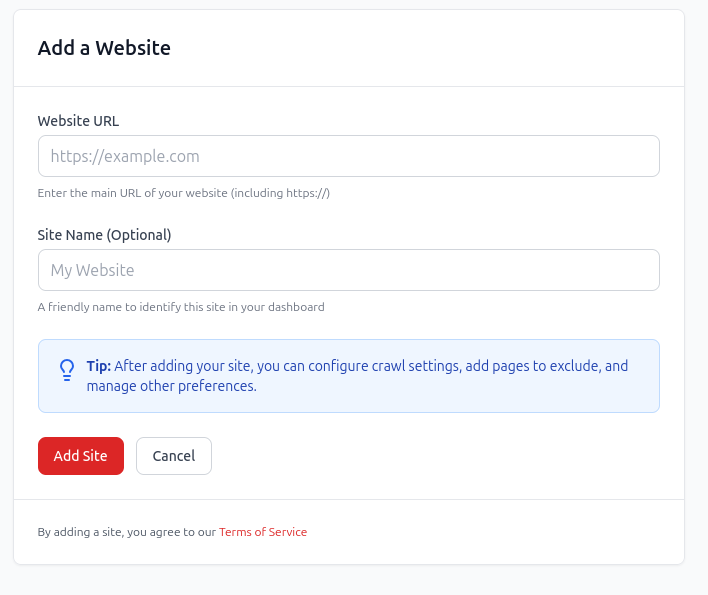
Start a crawl without installing a CMS plugin or giving redCacti permission to modify the website. The free plan supports one website and up to 1,000 pages. Paid plans support up to 10,000 pages per site by default.
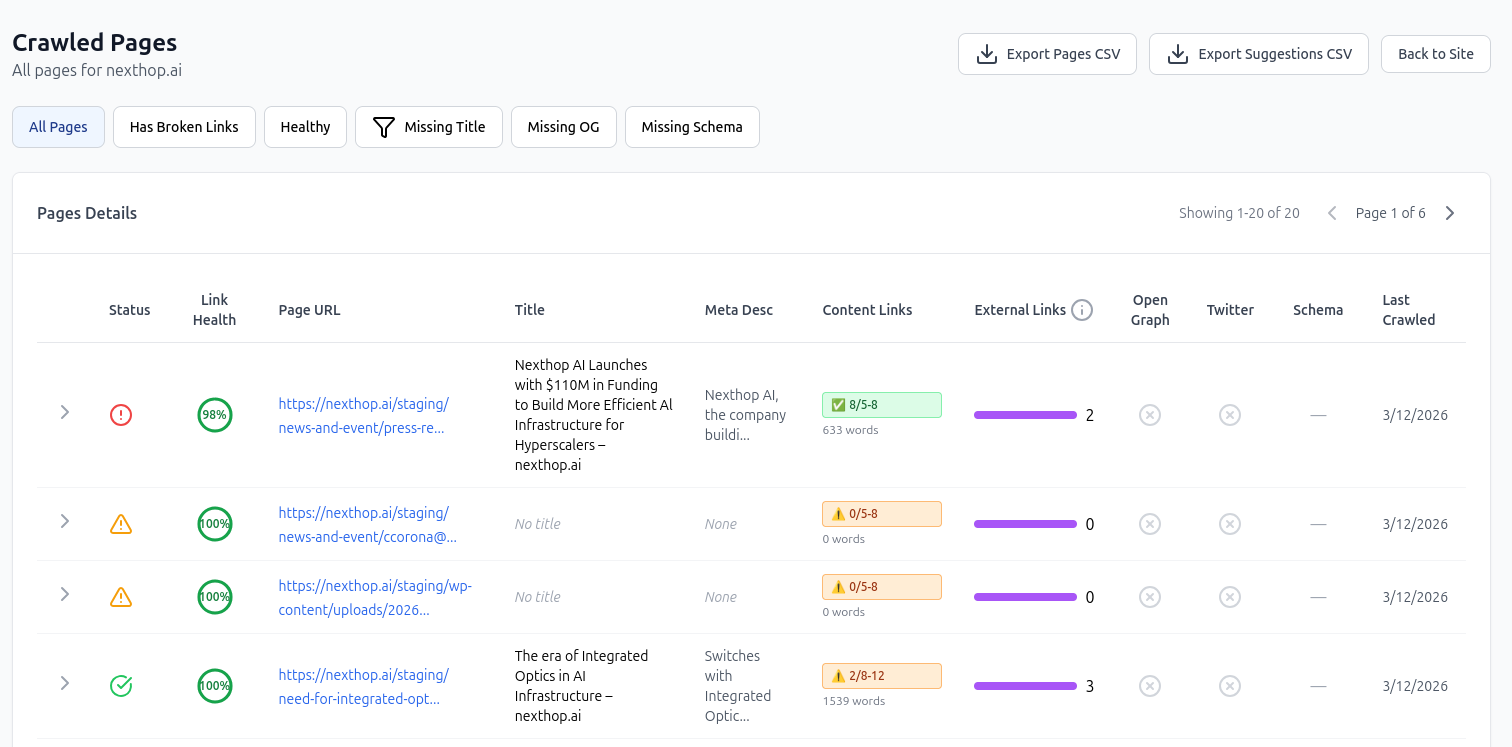
Start with page availability, redirects, broken links, orphan pages, and other structural findings. Resolve template-level or high-impact issues before working through lower-priority cleanup.
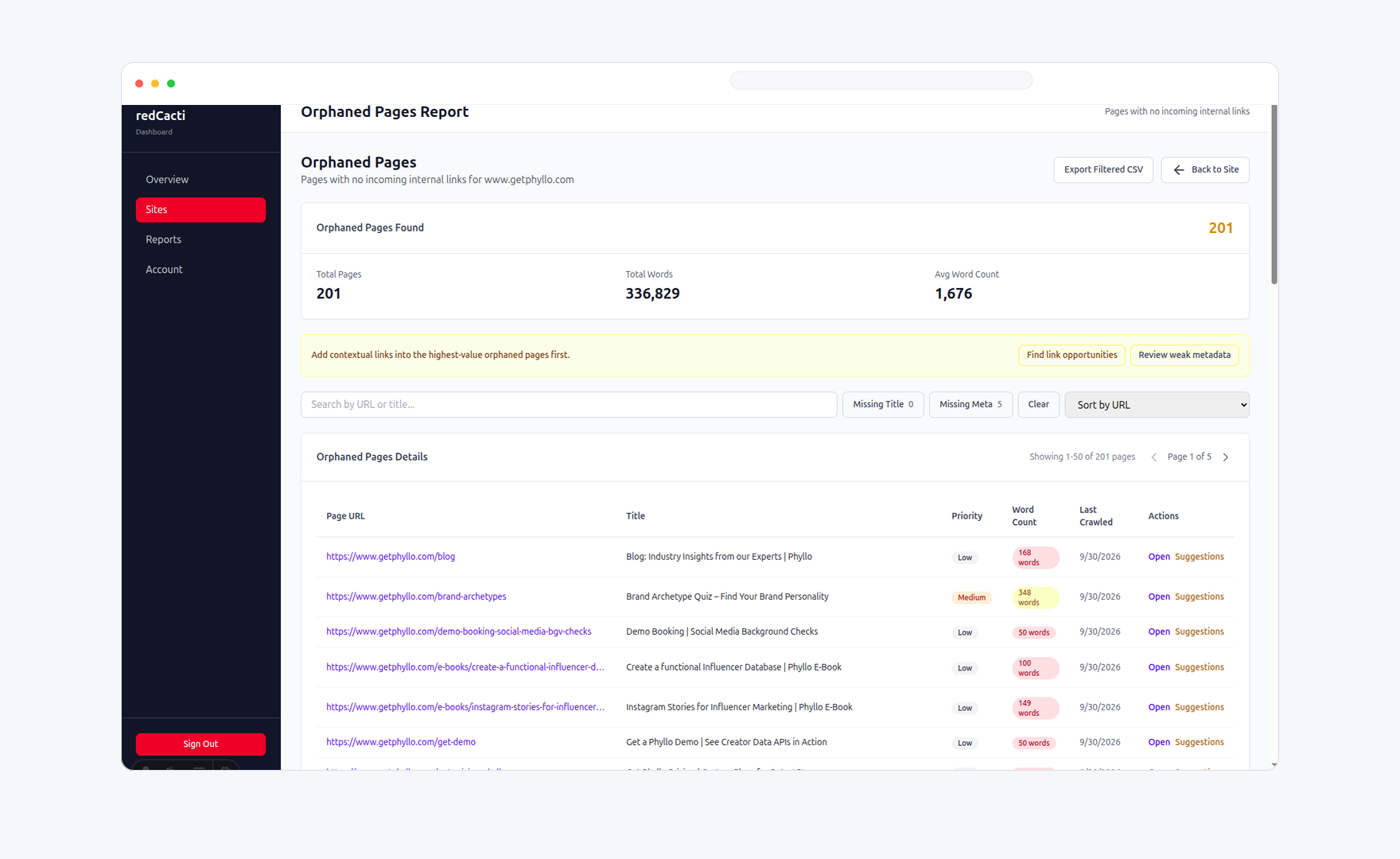
For each page with no incoming internal links, decide whether it should receive a contextual link, be added to a hub, consolidated, redirected, removed, or intentionally remain outside the normal structure.
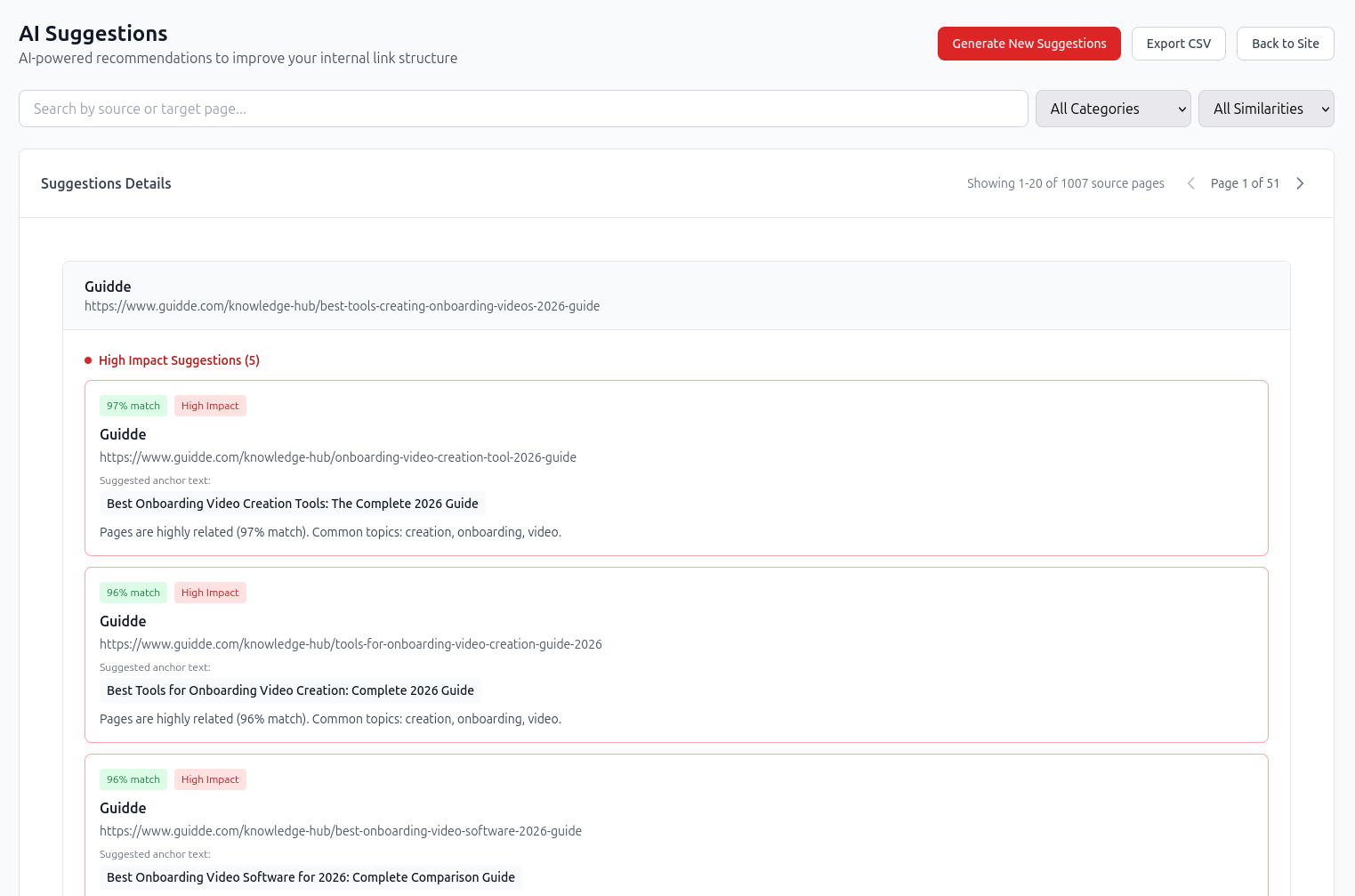
redCacti can recommend a source page, target page, suggested anchor, topical relationship, and priority signal. It does not add links automatically; your team reviews the context and implements approved links in the CMS or codebase.
Source: /blog/customer-onboarding-video-examples/
Target: /blog/how-to-create-an-onboarding-video/
Suggested anchor: create an onboarding video
Reason: Both pages cover video creation and customer onboarding.
Pro and Agency plans support daily or weekly scheduled crawls. Use them to catch newly broken links, orphan pages, metadata problems, redirects, server errors, SSL issues, and site-health changes as the website evolves.
Run your first SaaS site crawlIt should cover crawlability, indexability, canonicals, robots directives, XML sitemaps, HTTP errors, redirects, internal linking, orphan pages, site architecture, metadata, structured data, JavaScript rendering, mobile usability, Core Web Vitals, and recurring monitoring. It should also evaluate how product, feature, use-case, integration, comparison, blog, and documentation pages connect to one another.
A SaaS website often contains multiple site sections, applications, subdomains, publishing systems, integration directories, comparison pages, and documentation. The audit therefore needs to examine both technical access and the relationship between product education, acquisition content, documentation, and conversion paths.
redCacti can audit recurring structural issues such as broken links, orphan pages, internal-link gaps, redirects, metadata coverage, external links, server errors, SSL status, and website-health changes. Use Search Console, PageSpeed Insights, browser developer tools, schema validators, log analyzers, and advanced crawlers for areas outside redCacti's scope.
Yes. redCacti crawls the public website rather than operating through a WordPress plugin. It can therefore analyze WordPress websites without a native WordPress integration. It recommends changes but does not write links into WordPress.
Yes, provided the public pages and links are crawlable. redCacti does not need direct CMS access because it analyzes the public website.
Not as part of its standard public website crawl. Private authenticated product screens typically require specialist authenticated crawling, application testing, or engineering tools.
A growing SaaS website should usually be crawled at least weekly. Daily crawling may be useful during migrations, redesigns, launches, and periods of frequent publishing. Smaller stable websites may use less frequent manual audits.
No. An orphan page may need a link, but it may also need to be consolidated, redirected, noindexed, removed, or deliberately left outside normal site navigation. Review the page's purpose before creating a new link.
No. Technical SEO helps search engines access and understand the website, but rankings also depend on relevance, content quality, competition, authority, user value, and other factors. Technical improvements remove obstacles; they do not guarantee a specific ranking outcome.
Yes, the URL can potentially still appear in search based on other signals even when Google cannot crawl the page content. Use the appropriate indexing controls when a URL should not appear in search.
No. Sitemap inclusion helps Google discover and understand preferred URLs, but it does not guarantee crawling, indexing, or canonical selection.
Find broken links, orphan pages, internal-link gaps, and structural problems across your public website. The free plan supports one website and up to 1,000 pages.
Run a free broken-link checkFocus specifically on whether important URLs can be discovered and reached.
Monitor internal and external link failures across recurring crawls.
Find crawlable pages with no incoming internal links.
Review source-to-target recommendations and suggested anchors.
Check sitemap URL quality and coverage.
Review crawler access rules.
Use a shorter, procedural audit workflow.
Compare free, Pro, and Agency limits.